How I Set Up Cross-Account ECR Access for Lambda Functions
The Use Case
Recently, I took on a project to deploy a new Lambda function in each of my AWS accounts to act as a filter for GuardDuty alerts. Based on internal logic, the function decides whether an alert needs immediate handling or can wait. Because it had to run across multiple accounts and regions (basically in every one of my accounts), I needed each copy to be able to pull a container image stored in a central Elastic Container Registry (ECR) repository in one of my accounts. This post is about setting up that access, not about the GuardDuty logic itself, which I may cover separately.
Reading the AWS documentation gave me a good sense of the moving parts. In this post I will show how I did it the Terraform way, and share a few things I learned along the way. Terraform, an Infrastructure as Code (IaC) tool, gives a consistent and automated way to manage resources across multiple AWS accounts and regions. I won’t cover Terraform from the ground up. You can read more about it here.
This post assumes a basic understanding of Terraform.
Overview
Many organizations keep their container images in a single AWS account to centralize management, versioning and security. When Lambda functions in other accounts and regions need those images, two things have to be true: the central repository has to allow those accounts to pull, and the image has to exist in the same region as each function.
AWS requires a Lambda function’s container image to live in the same region as the function. To satisfy that without copying images by hand, I used ECR replication to push the image into every region where a function runs. Replication here happens within the central account, across regions. The cross-account part is handled separately, by the repository policies.
A High-Level Overview of the Solution
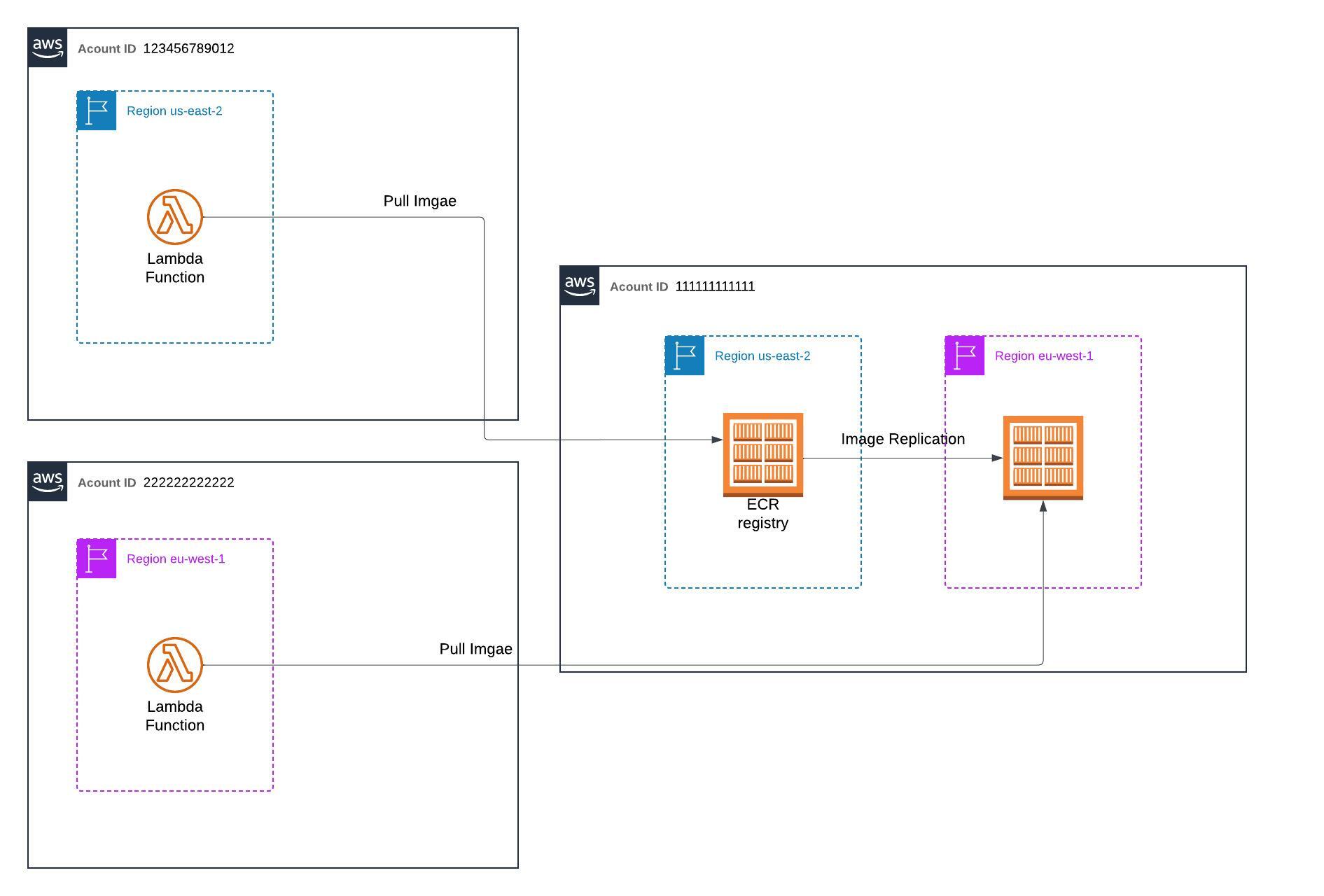
With the shape of the solution clear, here is how I built it.
Some Facts to Consider
I manage several repositories in account ID 111111111111, region us-east-2. Some of them need to be pullable by Lambda, but not all of them need to be replicated. Any repository that does get replicated to another region also needs a repository policy in that region so Lambda can pull it there.
In short:
- Lambda access does not imply replication.
- Replication does imply a repository policy for Lambda in the destination region.
The Solution
The Terraform module iterates over a list of repository names (var.repository_names) using for_each:
resource "aws_ecr_repository" "example_registry" {
  for_each = toset(var.repository_names)
  name     = each.value
}
To decide which repositories Lambda should be able to pull, I keep a small map (var.ecr_lambda_access):
ecr_lambda_access = {
  "repo_name_1" = true
  "repo_name_2" = true
  "repo_name_3" = false
}
My first instinct was to tag each repository from this map and gate pull access with an aws:ResourceTag condition in the repository policy. I walked away from that, and it is the main thing I want to flag in this post. AWS documents tag-based control of ECR pulls for identity-based policies (its own example gates ecr:BatchGetImage with ecr:ResourceTag), but my gate had to live in the repository policy, where the principals are other accounts and the Lambda service, and I found no AWS documentation that commits to tag conditions behaving that way there. An access control I cannot verify from the docs is not one I will build on.
The reliable way to control which repositories Lambda can pull is to attach the policy only to the repositories that should have it, and to decide that in Terraform rather than in an IAM condition:
locals {
  # Which repositories Lambda can pull is decided explicitly here, in
  # Terraform, not by a tag condition in the policy.
  lambda_repositories = [
    for name in var.repository_names : name
    if lookup(var.ecr_lambda_access, name, false)
  ]
}

resource "aws_ecr_repository_policy" "lambda_access" {
  for_each   = toset(local.lambda_repositories)
  repository = each.value
  policy     = local.ecr_repository_policy
}
The policy referenced above (local.ecr_repository_policy) grants cross-account pull access to the accounts that need it, and lets the Lambda service pull, scoped to the functions that pull from it with aws:SourceArn:
{
  "Version": "2012-10-17",
  "Statement": [
    {
      "Sid": "CrossAccountAccess",
      "Effect": "Allow",
      "Principal": {
        "AWS": [
          "arn:aws:iam::123456789012:root",
          "arn:aws:iam::222222222222:root"
        ]
      },
      "Action": [
        "ecr:GetDownloadUrlForLayer",
        "ecr:BatchGetImage",
        "ecr:BatchCheckLayerAvailability",
        "ecr:ListImages"
      ]
    },
    {
      "Sid": "LambdaECRImageRetrievalPolicy",
      "Effect": "Allow",
      "Principal": {
        "Service": "lambda.amazonaws.com"
      },
      "Action": [
        "ecr:BatchGetImage",
        "ecr:GetDownloadUrlForLayer"
      ],
      "Condition": {
        "ArnLike": {
          "aws:SourceArn": [
            "arn:aws:lambda:us-east-2:123456789012:function:*",
            "arn:aws:lambda:us-east-2:222222222222:function:*"
          ]
        }
      }
    }
  ]
}
There is one prerequisite on the other side. Cross-account access needs both halves, so the role that creates the function in each consumer account also needs ecr:BatchGetImage and ecr:GetDownloadUrlForLayer in its identity-based policy.
A couple of details worth calling out. The policy version is 2012-10-17, the current policy language. The older 2008-10-17 does not support modern policy features. For the Lambda condition I use ArnLike with aws:SourceArn, which is the operator AWS documents for matching ARN-shaped values. StringLike happens to work too, but ArnLike is the correct fit. Repository policies apply to the repository they are attached to, so the Resource element can be omitted.
After the default region is covered, replication handles the same-region requirement for the other regions, using the aws_ecr_replication_configuration resource.
I replicate only to the regions where a function runs. In my case that is eu-west-1. The replication stays inside the central account and copies images across regions, which is why registry_id is the central account itself (data.aws_caller_identity.current.account_id). The cross-account access is handled by the repository policies, not by replication.
The dynamic block iterates over var.repository_to_replicate, a list of repository prefixes to include in replication. It avoids hardcoding multiple repository_filter blocks and keeps the configuration easy to grow.
For each prefix, it generates a repository_filter block with:
filter: the prefix for repositories to match.filter_type: set toPREFIX_MATCH.
This filter controls which repositories are replicated.
Here is the implementation:
resource "aws_ecr_replication_configuration" "example" {
  replication_configuration {
    rule {
      destination {
        region      = "eu-west-1"
        registry_id = data.aws_caller_identity.current.account_id
      }
      dynamic "repository_filter" {
        for_each = toset(var.repository_to_replicate)
        content {
          filter      = repository_filter.value
          filter_type = "PREFIX_MATCH"
        }
      }
    }
  }
}
Region-Specific Repository Policies
Repository policies are not replicated, so each replicated repository needs its own policy in the destination region for Lambda to pull it there.
To do this, I use the AWS provider’s alias for the replicated region (here eu-west-1) and create repository policies for the replicated repositories:
provider "aws" {
  alias  = "ireland_region"
  region = "eu-west-1"
}

resource "aws_ecr_repository_policy" "elastic_container_registry_policy_ireland" {
  for_each   = toset(var.repository_to_replicate)
  provider   = aws.ireland_region
  repository = each.value
  depends_on = [module.elastic_container_registry]
  policy     = <<EOF
{
  "Version": "2012-10-17",
  "Statement": [
    {
      "Sid": "CrossAccountAccess",
      "Effect": "Allow",
      "Principal": {
        "AWS": "arn:aws:iam::222222222222:root"
      },
      "Action": [
        "ecr:BatchCheckLayerAvailability",
        "ecr:BatchGetImage",
        "ecr:GetDownloadUrlForLayer",
        "ecr:ListImages"
      ]
    },
    {
      "Sid": "LambdaECRImageRetrievalPolicy",
      "Effect": "Allow",
      "Principal": {
        "Service": "lambda.amazonaws.com"
      },
      "Action": [
        "ecr:BatchGetImage",
        "ecr:GetDownloadUrlForLayer"
      ],
      "Condition": {
        "ArnLike": {
          "aws:SourceArn": "arn:aws:lambda:eu-west-1:222222222222:function:*"
        }
      }
    }
  ]
}
EOF
}
This keeps the configuration modular and gives Lambda access to the replicated repositories in each region.
Conclusion
That is how I set up cross-account, cross-region access for Lambda functions to pull container images from a central ECR repository, with a Terraform setup that grows with the account list.
The lesson I keep coming back to is that an access control is only as good as the documentation behind it. For gating ECR pulls from a repository policy, explicit attachment in Terraform is the control I can verify. A tag condition there is one I cannot.
I hope it helps with your own setup.
Securing cloud infrastructure like this?
We help startups and scale-ups get cloud security to a baseline they can show. Let's talk.